Writing Quant Strategies with Claude

Building quant strategies has a high barrier to entry: you need to understand trading logic and write code. Claude cuts that barrier in half — you just need to know the trading logic, and it handles the code part.
This article documents my process of building a complete quantitative signal system from scratch with Claude.
My Strategy Background
I run a breakout trend strategy with Donchian Channels as the core logic:
- When price breaks above the highest high of the last N candles → buy
- When price breaks below the lowest low of the last M candles → sell
Sounds simple, but building a system that runs automatically across 8 assets, 3 timeframes, and pushes signals to Telegram every 30 minutes requires real engineering work.
Step 1: Describing Strategy Logic to Claude
My prompt was straightforward:
“Write me a Python script that pulls 1-hour BTC candles using yfinance and implements a Donchian Channel breakout strategy: buy when price breaks above the highest of the last 20 candles, sell when it breaks below the lowest of the last 10 candles. Send Telegram messages via openclaw whenever the signal changes.”
Claude’s initial version covered:
- yfinance data fetching
- Signal calculation logic
- State persistence (to avoid duplicate messages)
- openclaw CLI calls for messaging
This step took about 10 minutes.
Step 2: Iterating & Improving
The initial strategy had one problem: false signals in choppy markets, buying and selling repeatedly and losing money to fees.
I told Claude:
“Skip buy signals during choppy markets (low ADX, tight ATR); only execute during trending conditions (ADX > 22, price above EMA200). Add ATR-based trailing stop-loss.”
Claude added these improvements:
- ADX state detection: distinguishing trending vs. choppy markets
- ATR trailing stop: dynamically adjusting stop-loss during the position
- Adaptive parameters: different ATR multipliers for different asset classes (crypto k=2.55, commodities k=1.8)
The iteration cycle was: I describe the problem → Claude refactors → I backtest → rinse and repeat. After about 3 rounds, the strategy stabilized.
Step 3: Multi-Asset & Multi-Timeframe
Scaling from single-asset to 8 assets hit an engineering bottleneck: fetching data for 8 assets simultaneously was slow, and yfinance has rate limits.
The solution was incremental caching with a “probe” mechanism Claude designed:
def probe_last_bar_ts(symbol, interval):
    """Only fetch the last few candles to check for new bars"""
    # If timestamp hasn't changed, skip recalculation entirely
    ...
Now on each run, symbols with no new data are skipped entirely — performance improved 5–10x.
Final Performance
Here’s the 2024+ backtest comparison: pure Donchian vs. the hybrid version (with ATR/ADX filters):
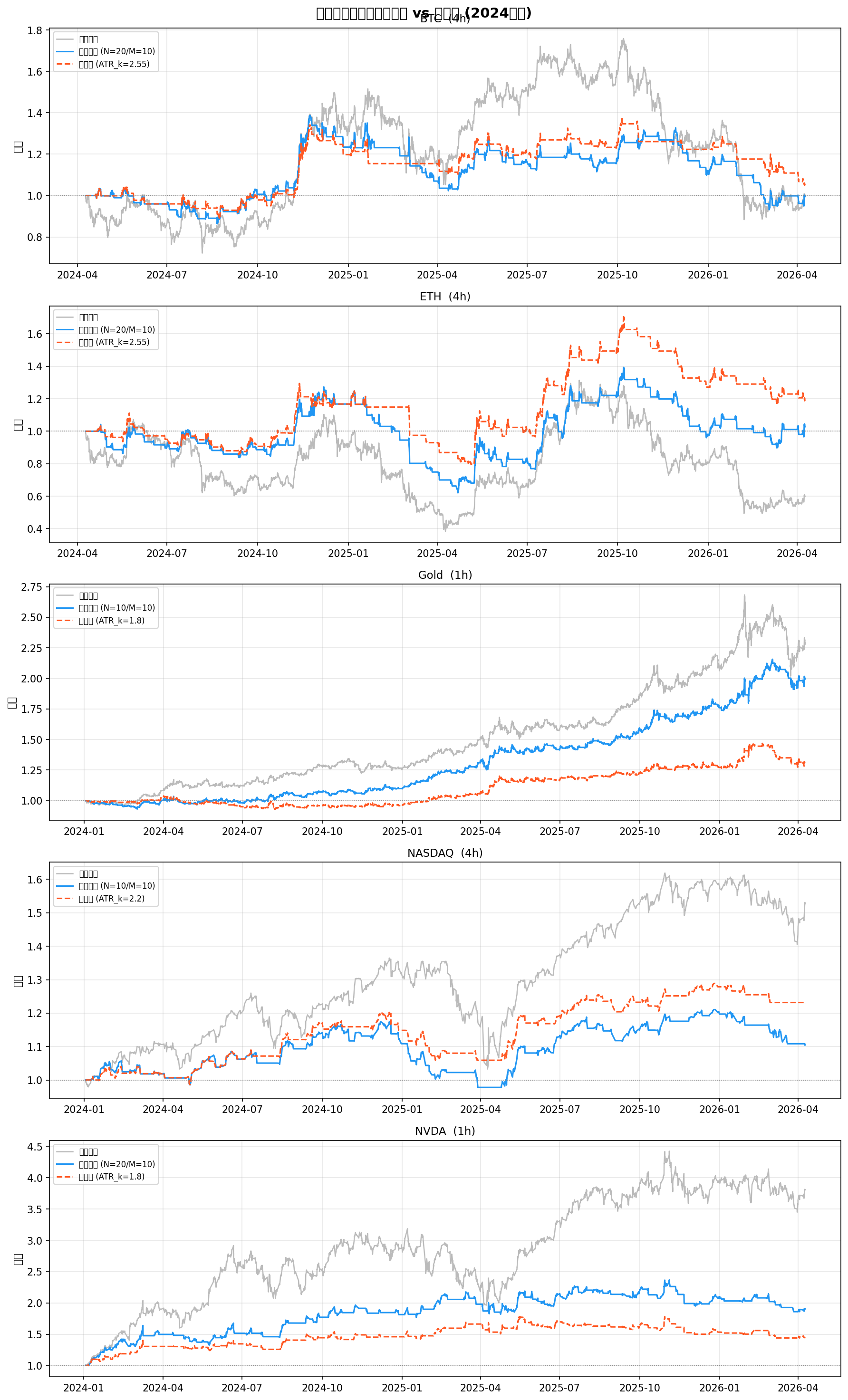
The hybrid version significantly reduced trade frequency during choppy markets (BTC H1 2024), cutting fee drag; during trending runs (BTC Q4 2024 rally), it tracked almost as well.
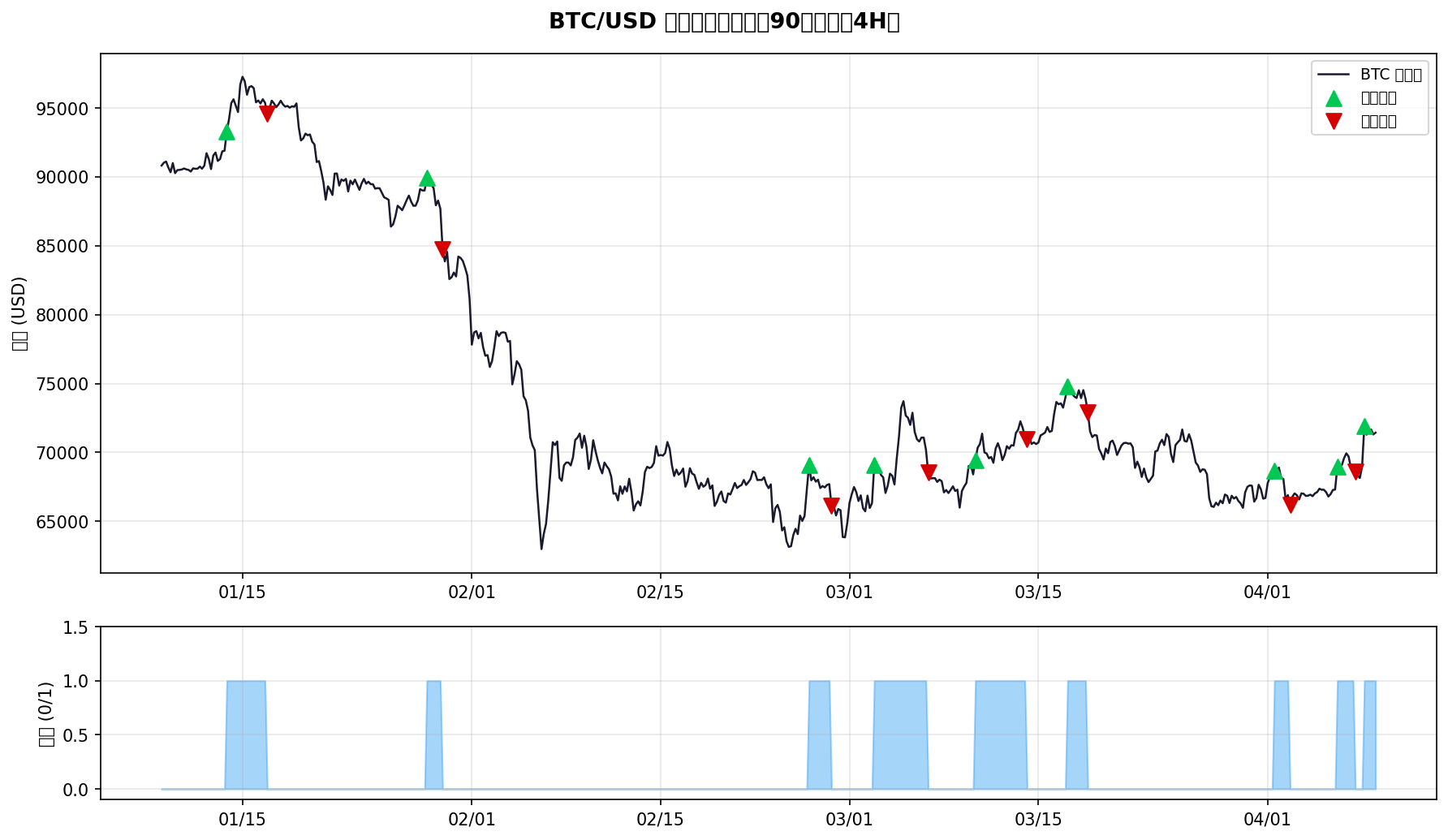
Signal annotations on BTC 4H with the hybrid strategy:
Key Lessons
1. Describe “anomalies” in natural language and let Claude fix them
Don’t say “optimize strategy performance.” Say “In BTC’s March 2024 consolidation, the strategy triggered 12 buy-sell cycles in two weeks and lost ~3% to fees — how can we reduce that?”
Specific problem descriptions beat vague optimization goals by 10x.
2. Have Claude explain first, then code
For complex logic (like adaptive state machines), have Claude explain the implementation approach in prose first, confirm the logic is correct, then write code. Saves tons of debugging.
3. Backtest on real data
Claude can simulate backtests and the results look great. But before going live, always run it on real historical data (yfinance is plenty) and verify the numbers match before deploying to production.
Toolchain
- Data: yfinance (free, covers stocks / futures / crypto)
- Compute: pandas, numpy
- Messaging: OpenClaw CLI (
openclaw message send) - Scheduling: Linux cron, runs every 30 minutes
- Hosting: runs on a local LAN Linux box, or any VPS
Questions about strategy code or backtesting methodology? Drop by Telegram.
⚠️ This article documents personal practice only and does not constitute investment advice. Past performance of quant strategies does not guarantee future results; live trading requires proper risk management.
📷 Cover image · Generated with Flux Schnell AI · panshi.io brand style