
Editor’s note: The article below is written by AI. This tool’s primary purpose is to avoid having your Macbook’s AIGC API calls go directly through domestic IPs and risk account suspension when traveling. Prerequisite: Surge must be configured to route AIGC traffic through specified chains (e.g., VPS→US residential bandwidth). This essentially guarantees 100% that you won’t accidentally route AIGC API directly through domestic internet.
At home, I run a fail-closed network protection scheme based on Surge + PF firewall: Surge handles proxy routing, and PF serves as the final kill switch—when the Surge process unexpectedly exits, outbound traffic is automatically blocked by PF, preventing direct leaks.
But here’s the problem: how do you know if your protection is working right now?
Staring at the Surge icon by eye clearly isn’t practical. So I built NetworkGuard—a tiny app living in the menu bar that runs a detection loop every 5 seconds and sends a system notification if something’s wrong.
What it looks like
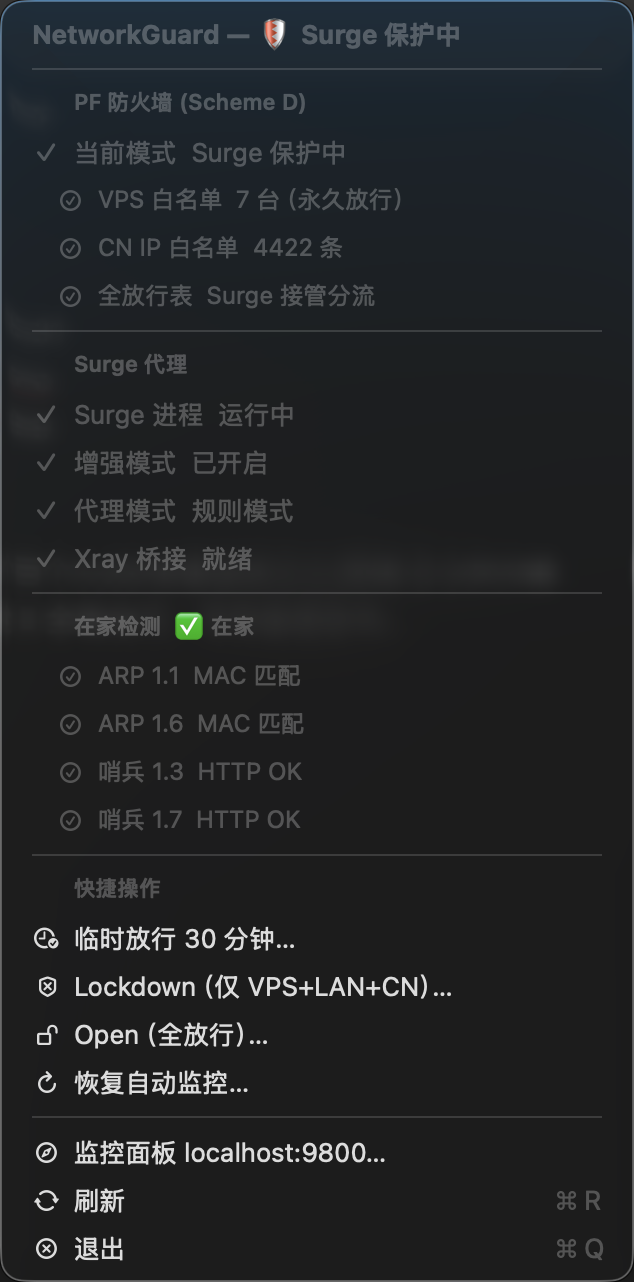
Open the menu and you get a complete system snapshot:
- PF firewall: Current mode (guarded / open / lockdown)
- Surge: Process status + enhanced mode + proxy mode (rule/proxy/direct)
- Xray bridge: Whether the fallback proxy port is LISTEN
- At-home detection: ARP + sentinel dual verification to confirm you’re on your home network
- Quick actions: Temporarily allow for 30 min, manually lockdown, restore auto monitoring
The menu bar icon uses SF Symbols for at-a-glance status:
| Icon | Meaning |
|---|---|
checkmark.shield | Optimal: guarded + Surge healthy |
exclamationmark.shield | Surge error, needs attention |
shield.slash | Auto lockdown (Surge down and away from home) |
lock.shield | Manually locked |
At-home detection: Why you need this
When you’re away from home, Surge crashing means you must lockdown—without a proxy chain, direct outbound connections leak. But on your home network, even if Surge crashes temporarily, your router and mihomo are still running, so traffic has another path—no need to lockdown immediately.
So surge-guard (the daemon controlling PF) checks whether you’re on your home network. The logic is:
at_home = (ARP local MAC match) AND (sentinel HTTP probe success)
Specifically:
- ARP group: Verify that MAC addresses of two LAN devices match (fallback to each other)
- Sentinel group: Send HTTP requests to two local servers (with token auth); either passing counts
- Need both types of evidence: ARP only proves you’re on the subnet; sentinel with token auth rules out spoofing
If either fails, you’re not considered at-home, and Surge will enter lockdown if it crashes.
Web monitoring dashboard
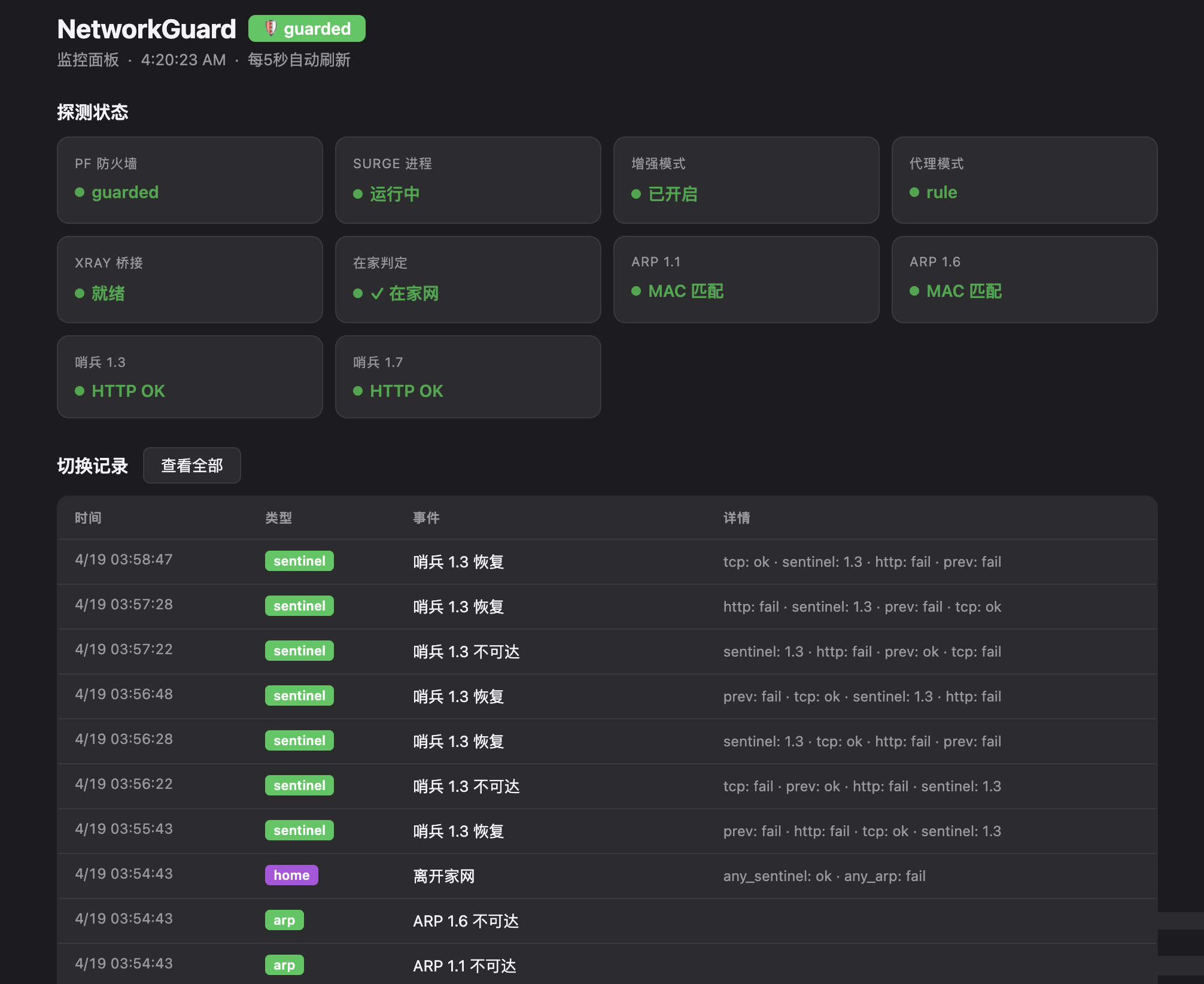
On startup, the app spins up an HTTP server on localhost:9800 with three endpoints:
localhost:9800/— HTML dashboard, auto-refreshes every 5 seconds/api/status— Current probe status (JSON)/api/events— Last 50 status change records
The dashboard shows real-time status of all probes plus a history of state transitions—every Surge restart, mode switch, or ARP state change is logged, making it easy to debug “why did the icon flicker just now” issues.
Event logs are stored locally in JSONL format, organized by type:
| Type | Trigger | Notifies |
|---|---|---|
| pf_mode | PF mode switch | ✅ |
| surge | Surge process/mode change | ✅ (process only) |
| sentinel | Sentinel reachability change | ❌ |
| home | Home/away toggle | ❌ |
| xray | Xray port change | ❌ |
| override | Temporary allow start/end | ✅ |
Notifications only fire for truly important events—sentinel jitter won’t bother you.
Debouncing: Fixing false positives
Early versions had an annoying problem: during the few seconds when Surge restarts, the app would falsely report “Surge process exited”, flash an exclamation mark, and send a notification—but Surge was just restarting.
Root cause: all probes used instant state switching—one failed check would flip the state.
The fix: add debouncing to each signal. State only switches after 3 consecutive failed checks (~15 seconds), but recovery takes effect immediately. A failStreak dict tracks consecutive failures per signal:
func debounce(_ key: String, rawOk: Bool, stableOk: Bool) -> Bool {
    if rawOk {
        failStreak[key] = 0
        return true          // recovery takes effect immediately
    }
    let streak = (failStreak[key] ?? 0) + 1
    failStreak[key] = streak
    return streak < 3 ? stableOk : false  // only switch after 3 consecutive failures
}
Surge gets extra protection: if the process exists but the API is temporarily unresponsive, we keep the last-known mode and enhanced state—one API timeout won’t trigger the warning icon.
Another gotcha: curl probes of the sentinel go through Surge’s TUN interface—when Surge restarts, the TUN is down and the probe fails. The fix: use --noproxy '*' to force direct LAN connection, bypassing the TUN:
curl -fsS --max-time 2 --noproxy '*' -H "X-Guard-Token: ..." http://local_ip:18888/healthz
Similarly, ARP cache refresh switched from ping (through TUN) to TCP port 80 connection (local subnet routing, bypassing Surge).
When Surge crashes: The 5-second window
This is something I carefully reasoned through when building the system.
Away from home, there’s roughly a 5-second window between Surge crash and lockdown. Network state during those 5 seconds:
- New outbound non-CN connections: Already blocked by PF (the allow_wan table in guarded mode is empty by design; PF rules are already blocking this traffic before Surge crashes)
- New CN IP connections: Direct and unblocked, but without proxy—bare connection
- Existing TCP connections: Still in PF state table; might transmit data for a few more seconds
After 5 seconds, lockdown kicks in and forcibly closes all existing connection states.
So the real risk window isn’t the “5 seconds after Surge crashes”—it’s pre-existing outbound connections with DIRECT rules that are mid-transmission when Surge crashes. The PF state table lets them live a few extra seconds.
On your home network, Surge crashing won’t trigger lockdown, because home_trusted holds—your router and mihomo are still running, so traffic is safe. This is by design.
Overall architecture
NetworkGuard itself doesn’t control any firewall rules—it only reads state files and sends system notifications. The actual PF controller is surge-guard.sh (a root daemon), and the two communicate via state files:
surge-guard.sh (root)
  ├── runs guard_once() every 5 seconds
  ├── controls PF anchor rules
  └── writes ~/.config/surge-guard/state

NetworkGuard.app (user space)
  ├── reads state file every 5 seconds
  ├── probes Surge API / ARP / sentinel / Xray
  └── sends system notifications + updates menu + logs events
One more design note: the NetworkGuard process is the master switch for the entire protection system. Each cycle, surge-guard.sh checks if NetworkGuard is running; if not, it automatically switches to open mode (allow everything)—letting your computer resume normal internet. Reopen the app and protection resumes.
The entire app is a single Swift file using AppKit + UserNotifications + Network Framework, compiles to ~300KB. If you also have a similar Surge + PF setup and want to visualize its status, this approach should be worth considering.
📷 Cover image · Flux Schnell AI generated · Panshi.io brand style